Setting up a Lead Form
Lead Forms are contact capture forms that you can utilise anywhere on the web to generate new leads from. You can create multiple forms in your system and completely customise what fields you'd like your recipients to complete, and customise how those fields are captured into a new lead within Leadpro.
Setting up a Lead Form
To get started, you can create a new form from the Forms page on your dashboard menu. From this page, you can create a new form using the 'New Page' action located at the top right.

Your new form has three header sections that you'll need to configure to create a fully function form.
Form Details This section lets you prepare the summary details, branding, and tracking aspects of your form. Here you can also set a GDPR consent switch, if deemed required.
Questions This section lets you prepare and order your form questions. There are a number of different question types and validations available to ensure you capture valuable inputs from your form recipients. Learn more about how to prepare your form questions in the following article: Lead Forms: Setting up form questions
Lead Forms: Setting up form questions
Actions This section lets you prepare what happens when a recipient submits a form response. You can prepare if and how a new lead is created from the responses given, and prepare if and how a notification email is generated. Learn more about how to prepare your form actions in this article: Lead Forms: Setting up form actions
Once you've supplied all the configuration required for a new form, you can press the 'Create' action located in the bottom right of the page and start making use of your new form!
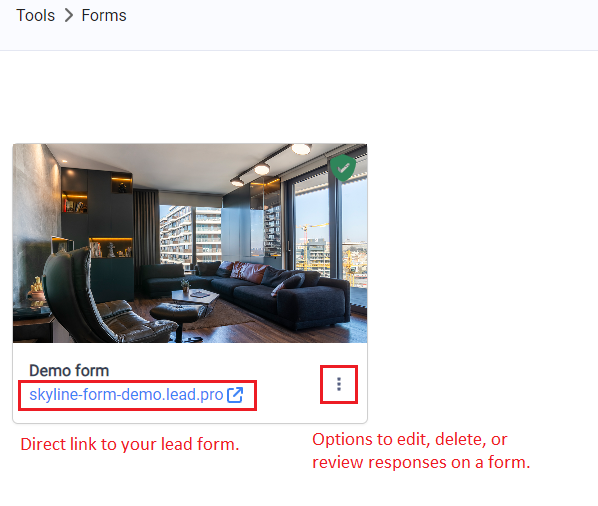
Back on the 'Lead Forms' page you'll find your new form. You can use the URL presented on a form's card to access and share the form link through social media or marketing campaigns. You can also open the menu and use the 'Settings' action to adjust your form configuration.
Form responses
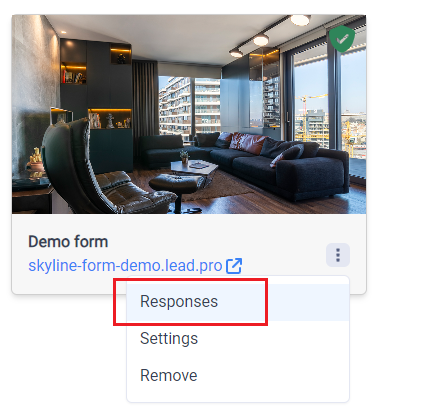
Regardless of your form actions, every submitted form response can be viewed in Leadpro from the 'Lead Forms' page, through the 'Responses' action on any lead form.